Effective date: 15 November 2026 Legal entity: Mohd Toshif, sole proprietor, trading as DMARC Harbor
For a step-by-step setup, read the Setup guide. This page answers the questions people ask most, one feature at a time, and says which plan each one starts on.
What it does§ Link
What is DMARC?§ Link
DMARC is an email authentication standard (RFC 9989, which replaced RFC 7489). It lets a domain publish a policy telling receiving mail servers what to do with mail that claims to come from that domain but fails the checks. Gmail, Yahoo and Microsoft require it for bulk senders.
What does DMARC Harbor actually do?§ Link
It reads the aggregate and forensic reports that receiving mail servers send about your clients' domains, and turns them into a verdict per domain, the senders behind it, and evidence you can hand to a client. It watches each domain's DNS, warns you when something changes or breaks, and helps you move each domain safely from p=none to p=reject.
Does it send email as my clients, or change their DNS?§ Link
It never sends mail as anyone. It changes DNS only when you ask it to, in one of two ways: through a Cloudflare connection you add, or by serving a record you have delegated to it with a CNAME (hosted DMARC, SPF, BIMI and MTA-STS). Every change is recorded and can be put back. Without either, it only reads.
Where do the reports come from?§ Link
From the mail servers that receive your clients' mail. Each domain publishes a reporting address we give you; those servers send reports there, usually once a day, and we read them.
Is it only for MSPs?§ Link
No. It is built for agencies and managed service providers, because they look after many client domains, but a single domain owner can use it too.
Getting set up§ Link
How do I start?§ Link
Create an account, create a workspace, add a client, then add its domains. Each domain needs two DNS records: a TXT record that proves you manage it, and a DMARC record with our reporting address. We give you both, word for word. The Setup guide walks through it.
How do I prove I manage a domain?§ Link
Publish the TXT record shown on the domain's setup page at _dmarc-harbor-verification.<domain>. A DMARC record that already sends reports to this client's own reporting address also counts as proof. Re-check from the setup page once DNS has updated.
How long until I see data?§ Link
Reports usually arrive within 24 to 48 hours of the DMARC record going live. Until the first one arrives, a domain reads as unmeasured, never as healthy.
What if the domain already has a DMARC record?§ Link
Keep it. Add our reporting address alongside the existing one so nothing is lost. If the domain already reports to another DMARC service, the switch kit builds the record that sends reports to both while you move over.
What if I use Cloudflare?§ Link
Add a Cloudflare connection with an API token that can edit DNS. You can then preview and publish the verification record and the DMARC record from the domain's page, and put a previous value back. Import domains on the connection lists the zones the token can see and adds the ones you choose to a client, so you do not type them. A workspace can hold up to 5 Cloudflare connections; with more than one, publishing starts on the one whose last check passed, moves to the next if that one cannot read the domain's zone, and you can pick another. Starts on Fairway.
My domain publishes reports to a web address instead of a mailbox. Do you collect those?§ Link
Not yet. A rua=https:// address means reports go to a web endpoint we do not read, so there is no report data for that domain until it also lists our mailbox address. Add our address beside it rather than replacing it.
Can I add many domains at once?§ Link
Yes. Paste a list, or import a CSV file, of up to 500 domains on a client's page, or use the API's bulk endpoints, which take up to 200 clients or 500 domains a request. Each row is checked on its own, so one bad line does not stop the rest.
I filed a domain under the wrong client. Can I move it?§ Link
Yes. On the Clients page, choose Move on the domain's row, or open the domain's setup page and choose Move at the bottom. An owner or admin can move it. Before anything changes you see what moves with it: reports, scans, alerts, digests, sender reviews and hosted records all stay attached to the domain. Share links follow the domain to the new client. Approval requests waiting on the old client's contacts are withdrawn, because they were asked about their own domain. Monthly reports already issued stay with the client they were issued for. The DMARC record in DNS is not changed: if it names the old client's report address, reports keep arriving, and the confirmation gives the new client's address to publish when you can. A domain in the middle of a provider switch cannot be moved until the switch ends. To undo a move, move the domain back.
Can I rename a client or the workspace?§ Link
Yes. Rename on a client's row in the Clients page changes its name, its short name (the slug), or both. Its report address, its Trust Center address and its domains stay the same. The workspace name is in Settings, Workspace; its address and id stay the same. Owners and admins can rename, and each rename is in the audit trail with the old and new names.
Can I deal with many alerts or share links at once?§ Link
Yes. On the Alerts page, Acknowledge all open acknowledges every open alert after you confirm the count, each with its own audit entry. On a domain's setup page, the Revoke button above the share links (it says how many are live) withdraws every live link for that domain at once. A withdrawn link stops working the next time someone opens it.
Can I export my client list?§ Link
Yes. Client book CSV on the Clients page downloads every client and domain, one row per domain, with the ids, report address, ownership state and DMARC policy, ready for a PSA or CRM import. A client with no domains yet has one row with the domain columns empty. Any role can download it, and each download is recorded.
Can I undo a delete?§ Link
No. Deleting a domain, a client or the workspace removes its reports and history for good, which is why each one first shows what it will delete and asks you to type the name. To put a domain under another client, move it instead; its history goes with it.
Can I check a domain without an account?§ Link
Yes. Enter it on the home page, or use the free tools under Free tools: a DMARC checker that reads the record tag by tag, an SPF checker that counts DNS lookups through every include, a DKIM checker for a selector's key, a BIMI checker for the logo record and file, a DMARC record generator, an aggregate report reader and an email header analyser. None needs an account and nothing is stored about the domain; the report reader and header analyser run in your browser and upload nothing. Each is one moment, not monitoring. There is also a glossary of terms and setup guides for eight email providers.
Can each client's alerts go to its own Slack or Teams channel?§ Link
Yes. Connect up to 20 channels of each, and limit each one to chosen clients and to chosen kinds of message, such as DNS changes to one channel and spoofing to another. Starts on Fairway.
Plans and billing§ Link
What are the plans?§ Link
Mooring (free), Fairway, Harbor and Admiralty, plus Fleet, which has Harbor's features and is priced per active domain, with a price per domain that falls as the count grows. The pricing page has the current prices, every limit and a full comparison.
What starts on which plan?§ Link
- Every plan, free included: aggregate reports, the audit trail, data export and erasure, DNS monitoring and change history, Gmail, Yahoo and Microsoft sender requirement checks, registration expiry dates, sender review, subdomains seen sending that you do not monitor, policy readiness for each step to
p=reject, the switch kit and two-step verification. - Fairway: alerts by email, Slack and Teams (including DNS change and expiry warnings), spoofing alerts, sender owners, webhooks, publishing through Cloudflare, hosted DMARC, the SPF check for unused includes, forensic reports with recipients unnamed, share links, TLS reports and 10 prospect reports a month.
- Harbor: the client portal and client approvals, named forensic evidence, scheduled digests, the API, PSA ticketing, managed SPF, hosted BIMI and MTA-STS, the Trust Center, compliance packs and monthly client reports, report collection from your own mailbox, your logo, colours and support contact in the portal, reports and client emails, the monthly usage export per client, Ask (product questions answered in the app from these pages), and 50 prospect reports a month.
- Admiralty: everything clients open on your own domain, client emails from your own address, single sign-on, an unlimited team, and 200 prospect reports a month.
- Fleet: everything in Harbor, including your logo and colours, for more domains, with an unlimited team and 200 prospect reports a month. Your own domain and single sign-on stay on Admiralty.
What are the limits on each plan?§ Link
| Limit | Mooring | Fairway | Harbor | Admiralty | Fleet |
|---|---|---|---|---|---|
| Clients | 1 | 5 | 20 | 75 | 1,000 |
| Active domains | 2 | 20 | 80 | 300 | 5,000 |
| Team members per workspace | 2 | 5 | 25 | No limit | No limit |
| Workspaces per account | 1 | 2 | 3 | 5 | 5 |
| Prospect reports a month | None | 10 | 50 | 200 | 200 |
The next answers say how each limit is counted. Other limits are the same on every plan: what counts as an active domain, how long data is kept, rate limits, the size of a bulk import, Cloudflare connections and digest recipients.
How many people can join a workspace?§ Link
Mooring 2, Fairway 5, Harbor 25, and Admiralty and Fleet have no limit. These are your own staff. A client's people sign in to the client portal instead, and they do not use a seat.
How is Fleet priced?§ Link
Per active domain a month, in bands:
| Active domains | Per domain | Smallest bill in the band |
|---|---|---|
| Up to 200 | $2.00 (₹169) | $150 (₹12,675), covering up to 75 |
| 201 to 500 | $1.25 (₹106) | $400 (₹33,920), covering up to 320 |
| 501 to 2,000 | $1.00 (₹85) | $625 (₹53,125), covering up to 625 |
| 2,001 to 5,000 | $0.75 (₹64) | $2,000.25 (₹1,70,688), covering up to 2,667 |
Adding a domain never lowers the bill. The count is measured before each month starts, with no proration. From 200 to 300 domains Admiralty costs about the same and adds your own domain and single sign-on.
How are the limits counted?§ Link
Clients and active domains are counted across every workspace your account owns, so a client book cannot be split across workspaces to fit a smaller plan. Workspaces are counted per account. Team members are counted per workspace, and open invitations count as seats.
A domain counts as active for its first 14 days, and whenever it has sent a report in the last 30 days. That is the same on every plan. A parked domain that has stopped reporting stops counting 30 days after its last report, and starts again the day a report arrives. On Fleet, this count is also what you are billed for.
What happens when I reach a limit?§ Link
Adding more is refused, and the message says which limit you reached and which plan raises it, or to contact us where no plan does. Nothing is deleted and nothing stops working.
Can I downgrade below what I am using?§ Link
No. If you have more clients, active domains, team members or workspaces than the smaller plan allows, we tell you exactly how many over you are on each limit, and you can remove the excess or stay where you are.
Cancelling is always allowed. When the paid period ends the workspace moves to Mooring with everything kept, and adding more is refused until you are within Mooring's limits.
What happens to features when I downgrade?§ Link
Nothing is deleted, and upgrading again brings everything back as it was.
- Hosted records keep being served so your clients' mail keeps working, but you can no longer change them. We email the workspace owners once, listing the records to move back to your own DNS.
- Alert rules, digests and a report mailbox are kept but stop running. A kept mailbox can still be disconnected, which deletes its stored password.
- Slack and Teams channels and digests can still be paused or removed, but not changed or switched back on.
- Share links and Trust Center pages answer as withdrawn while the plan does not include them, and work again after an upgrade.
- Single sign-on stops admitting new people at once; existing members get 30 days.
- Your logo and colours stop showing below Harbor, and the stored logo is removed. A custom domain kept from Admiralty stops being used, and new client links use our address; you can remove it. See "What happens to single sign-on if we leave Admiralty?" below.
When does a plan change take effect?§ Link
It depends on how you pay. Paying in rupees through Razorpay, an upgrade applies straight away and nothing is charged then: the difference for the rest of the period is added to your next renewal. That needs a saved payment method that can take the next renewal; when it cannot (the mandate was paused or cancelled at your bank, or its limit is lower), the upgrade starts with the next period instead. If you cancel while that difference is still unpaid, the plan goes back to the one you paid for. A downgrade, or a move between monthly and annual, takes effect at the end of the period you have paid for. Paying in dollars through Paddle, any change applies straight away and Paddle prorates the difference. The billing page says which applies to you before you confirm.
If I upgrade, do I pay the full price of the new plan?§ Link
No, you pay only the difference for the days left. Nothing you have paid is lost. For example, you pay for Fairway (₹3,299 a month) from 1 November and move to Harbor (₹12,499) on 16 November, with half the month left:
- Paying in rupees: you have Harbor at once and nothing is charged that day. Your renewal on 1 December is ₹12,499 for December plus ₹4,600, half of the ₹9,200 difference, for the rest of November: ₹17,099. From 1 January it is ₹12,499.
- Paying in dollars: Paddle charges the difference for the rest of the month straight away, and the next invoice on the same date is the new price.
The billing page shows the exact amounts before you confirm.
If I downgrade, do I get money back?§ Link
Paying in rupees, no: you keep the plan you paid for until the end of the period, then the smaller plan starts and renews at its own price. Nothing is refunded for the rest of the period, because you still have everything until then. Paying in dollars, the change applies at once and Paddle credits the unused time against your next invoices. Either way nothing is deleted, and a downgrade is refused only while you use more than the smaller plan allows.
I upgraded, then downgraded in the same month. What do I pay?§ Link
The difference for the days you spent on the bigger plan is still owed, and is added to your next renewal with the smaller plan's price. You never pay twice for the same days.
When does my billing month start and end?§ Link
On the day and at the time you pay. A plan bought on 15 November at 3pm runs to 15 December at 3pm, then renews for 15 December to 15 January, and so on. A plan bought on the 31st renews on the last day of shorter months (30 April, 28 February) and goes back to the 31st when the month has one. An annual plan runs to the same date next year. There is no charge for a part month.
Can I switch between monthly and annual?§ Link
Yes. Paying in rupees, the switch applies when the current period ends, and the first charge on the new interval is the new price. Paying in dollars, it applies at once and Paddle prorates it like any other change. Annual costs ten months' price for twelve. Fleet is monthly only. The billing page shows when the switch applies before you confirm.
I added domains in the middle of the month on Fleet. Am I charged now?§ Link
No. Fleet is counted when each period starts and billed for that month, with no charge in between. A domain you add in the month is billed from the next renewal; one that stops reporting stops counting 30 days after its last report. You are always billed for at least the minimum of your band.
If I cancel, can I change my mind?§ Link
Yes, until the period ends: choose "Keep" on the billing page and nothing changes. After it ends the workspace moves to the free plan with everything kept, and buying a plan again begins a new period from that day.
Can I change the card or UPI account I pay with?§ Link
Paying in dollars, change it in Paddle's billing portal, from the billing page. Paying in rupees, write to support and we send you a payment link for your next renewal; the method you pay it with becomes the saved one. If a renewal cannot be charged to your saved method, the link comes to you by itself.
How are renewals paid in rupees?§ Link
At checkout you choose a card, UPI Autopay or a bank mandate (eNACH), pay the first period and approve automatic renewals up to a maximum. We email you three days before each renewal with the amount and date. Above ₹15,000 a charge, your bank asks you to approve a card or UPI debit, and UPI Autopay is not offered. If a renewal cannot be charged (the mandate was paused or cancelled, it is below the amount, or the bank declined it), we email a payment link instead; paying it renews the plan and sets the mandate up again.
Do I get a refund?§ Link
There is a 14-day money-back guarantee on your first payment. It applies once per customer. After that, refunds are considered case by case, for example for a double charge or a fault on our side. See the Refund Policy.
A refund ends the subscription that day and the workspace moves to Mooring, with every client, domain and report kept. Cancelling without a refund keeps the plan until the end of the period you paid for.
Is tax added to the price?§ Link
Prices are shown before tax. Paying in dollars, Paddle is the reseller and handles tax: in the US and Canada it adds sales tax on its payment page, and in most other countries tax is included in the price. Paying in rupees, no GST is charged at present.
Which currency am I charged in?§ Link
Rupees are processed by Razorpay and US dollars by Paddle. You choose before your first payment, and it is fixed after that, because changing it would mean moving a live subscription between two payment processors.
What happens if my payment fails?§ Link
We tell you and retry. You keep full access for 7 days after the paid period ends, and we tell you the exact date. If it is still unpaid then, the workspace moves to the free plan with all its data kept; upgrading brings everything back.
Can I pay by invoice or bank transfer?§ Link
Not at present. Pay by card through Razorpay or Paddle.
Is there a free trial of the paid plans?§ Link
No. Mooring is free with no card and no time limit, and the 14-day money-back guarantee covers your first payment.
Monitoring and alerts§ Link
What do the five words on a domain mean?§ Link
Each domain reads as exactly one of pass, block, unverified, stale or unmeasured, chosen from report data. A domain that has never reported is never called passing, and one that stopped reporting says so.
What are senders, and what should I do with them?§ Link
Senders are the services and servers that sent mail as a domain. Mark each one as yours or not yours. A failing sender that is yours keeps blocking enforcement until its SPF or DKIM is fixed, because enforcing would stop its real mail. A failing sender you mark as not yours stops blocking, because stopping it is the point. On Fairway and above you can name an owner for each sender, so the person who fixes it is recorded.
Will I find out about subdomains nobody told me about?§ Link
Yes, on every plan. Each domain's Subdomains tab lists the names below it, such as news.example.com, that receivers reported sending mail in the last 90 days and that you do not monitor, with their volume and pass rate. Monitor a name to add it to the client as a domain, or dismiss it. A low pass rate there is either a service nobody set up or someone using a name that looks like the client's.
How do alerts work?§ Link
Create alert rules per domain, for example on failure rate, volume from one source, report silence or new unauthenticated sources. Alerts go by email, and to Slack or Microsoft Teams if you connect a channel. Unacknowledged alerts are repeated and then rolled up to owners and admins, respecting each person's quiet hours. Starts on Fairway; spoofing alerts also start on Fairway.
Does it watch DNS?§ Link
Yes, on every plan. Each verified domain is re-read about once a day, and every change to its DMARC, SPF, DKIM, MX, MTA-STS, TLS-RPT or BIMI records is kept in its history. A change marked warning or critical, such as a weaker policy or a removed record, can be acknowledged there; an informational one, such as a new DKIM selector, needs nothing. Warnings about changes are sent on Fairway and above.
Does it warn me before a domain registration expires?§ Link
The expiry date is read from the registry over RDAP and shown on every plan. Warnings at 30, 14, 7 and 1 days, and on the day, are sent on Fairway and above. Some country-code registries publish no expiry date; the domain says so.
Does it check the Gmail, Yahoo and Microsoft sender rules?§ Link
Yes, on every plan. Each domain's page shows which of the bulk sender requirements it meets and what is missing.
Can alerts open tickets in my PSA?§ Link
Yes. HaloPSA is supported. ConnectWise PSA and Autotask are in early access: they are built to each vendor's published API but not yet run against a live account, so we set them up with you and check the first tickets together. Map each client to a PSA company, and alerts open, update and close tickets there. Starts on Harbor.
Can I get events in my own systems?§ Link
Yes. Webhooks send signed events: domain.verified, alert.triggered, dns.changed, policy.changed, report.received, forensic.received, tlsrpt.received and entitlement.exceeded. Each delivery is logged and can be replayed. Starts on Fairway.
Moving to enforcement§ Link
How do I know a domain is ready for quarantine or reject?§ Link
Each domain's page shows its readiness: days and messages observed, pass rate, failing and new senders, open alerts, and for reject a month at quarantine and DKIM on nearly all mail. It names what still blocks the next step.
What is hosted DMARC?§ Link
You point _dmarc at us once with a CNAME, and change the policy from the domain's page after that, with no DNS edit and every change kept and reversible. You can stop hosting at any time; we keep serving until your own record is back. Starts on Fairway.
Can my client approve enforcement?§ Link
Yes. Ask for the next step from the domain's page and every portal contact at that client is emailed under your brand. They read what changes, the risk to their own mail and the evidence, then approve or decline in the portal, and the decision is recorded under their account. A hosted record changes the moment they approve; otherwise you get the exact record to publish. Requests expire after 14 days. Starts on Harbor.
What about SPF's 10-lookup limit?§ Link
Managed SPF publishes a flattened SPF record from the services you list and keeps it current, so the domain stays under the limit. Starts on Harbor.
Can you tell me which SPF includes are no longer used?§ Link
Yes, from Fairway. On a domain's Reporting and setup tab, choose Check SPF sources. Each include and address range in the SPF record is resolved to the servers it allows and matched against the servers that actually sent the domain's mail in the last 90 days. A source with no mail is marked, with the lookups removing it would free. Nothing is called unused until there are reports on at least 14 days, and an include that cannot be resolved in advance (for example one using exists) is shown as not checkable rather than unused. On the free plan every scan still counts the record's lookups and warns when it goes over 10.
Do you support BIMI and MTA-STS?§ Link
Yes. Hosted BIMI serves your logo and certificate; hosted MTA-STS serves the policy file and record for you. Gmail and Apple Mail show the logo only with a mark certificate (a VMC or CMC) bought from a certificate authority such as DigiCert; Yahoo and Fastmail can show it without one. Hosted BIMI has been run end to end with a test certificate, so the first real certificate is checked with you (early access until then). TLS reports (TLS-RPT) show delivery problems to your mail servers. Hosted BIMI and MTA-STS start on Harbor. Viewing TLS reports starts on Fairway; they are collected on every plan, so reports received before an upgrade appear afterwards.
Clients, sharing and branding§ Link
Can my clients see their own data?§ Link
Yes. The client portal gives a contact you invite read-only access to their own verified domains, senders and monthly reports, and lets them answer approval requests. They sign in with their email address, or with Google or Microsoft, from the invitation link or the ordinary sign-in page, which offers them their report rather than a workspace. It never shows forensic data. Starts on Harbor.
Can I share a report without giving portal access?§ Link
Yes. A share link opens a read-only report for one domain in a browser, with no sign-in. It expires after the number of days you choose, up to a year, and you can revoke it at any time. Starts on Fairway.
What are digests and monthly reports?§ Link
A digest is a scheduled email, weekly or monthly, summarising a domain for up to 20 addresses you choose. A monthly report is a PDF per client for each complete month, downloadable by you and by the client in the portal. Both start on Harbor.
What is a compliance pack?§ Link
A PDF, per client, with each domain's email authentication evidence and a statement of what data is held, who can read it, how long it is kept and which sub-processors are used. When it is issued its SHA-256 fingerprint is recorded, and anyone holding a copy can check it on the verify page: a changed copy does not match. The PDF does not carry a digital signature. Starts on Harbor.
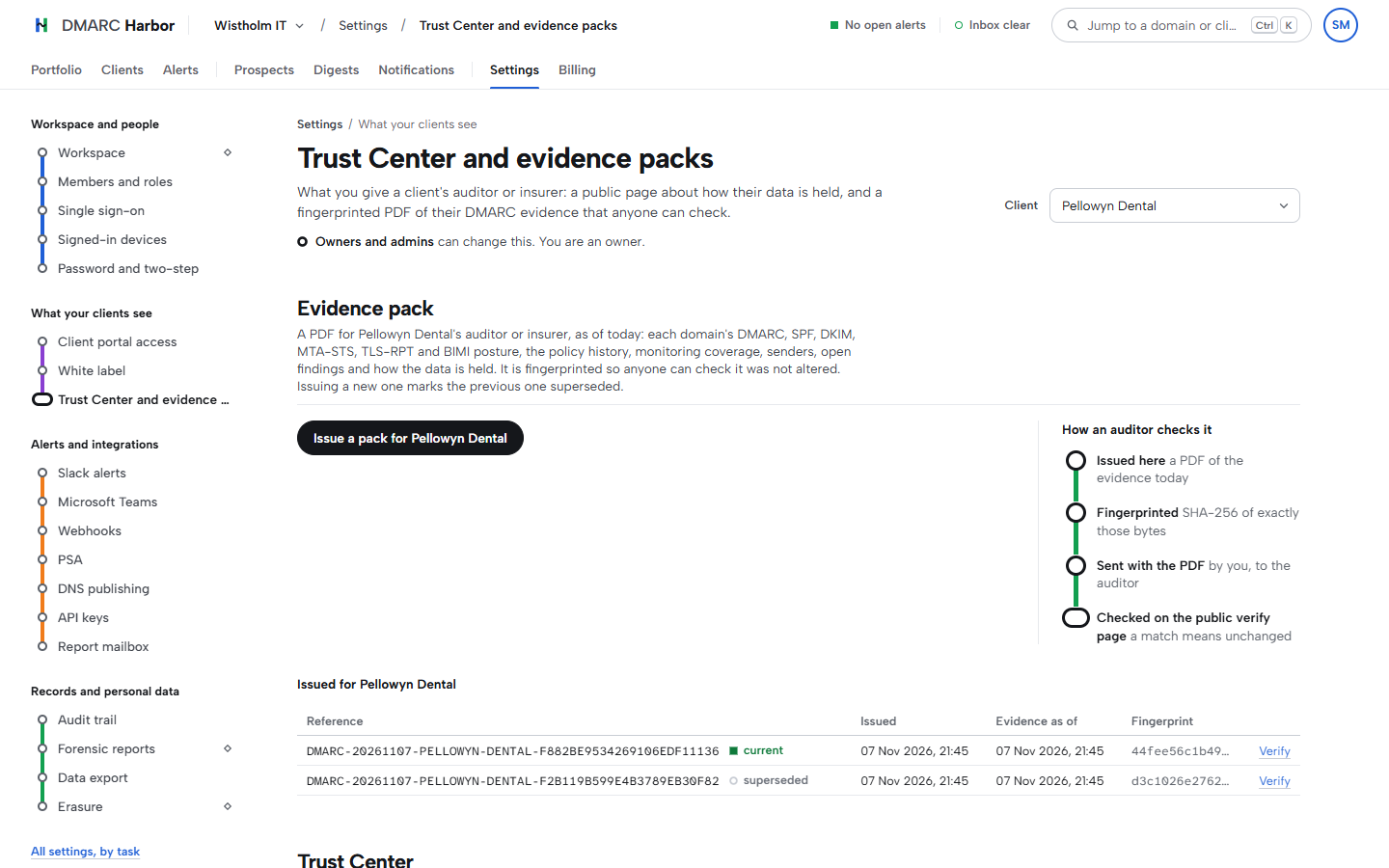
What is a Trust Center?§ Link
A public page per client, at an address that cannot be guessed and that search engines are asked not to list. It shows each domain's email authentication as last checked (DMARC policy, SPF, DKIM, MTA-STS, TLS-RPT and BIMI), the policy history, how much of the mail is reported, the senders seen and the open findings. It then states how the data is handled: what is held, who can read it, retention, where it is stored, sub-processors and completed erasures, and lists the compliance packs issued so a holder can check one. Everything is generated from the live record when the page opens. You can forward it to an auditor. Starts on Harbor.
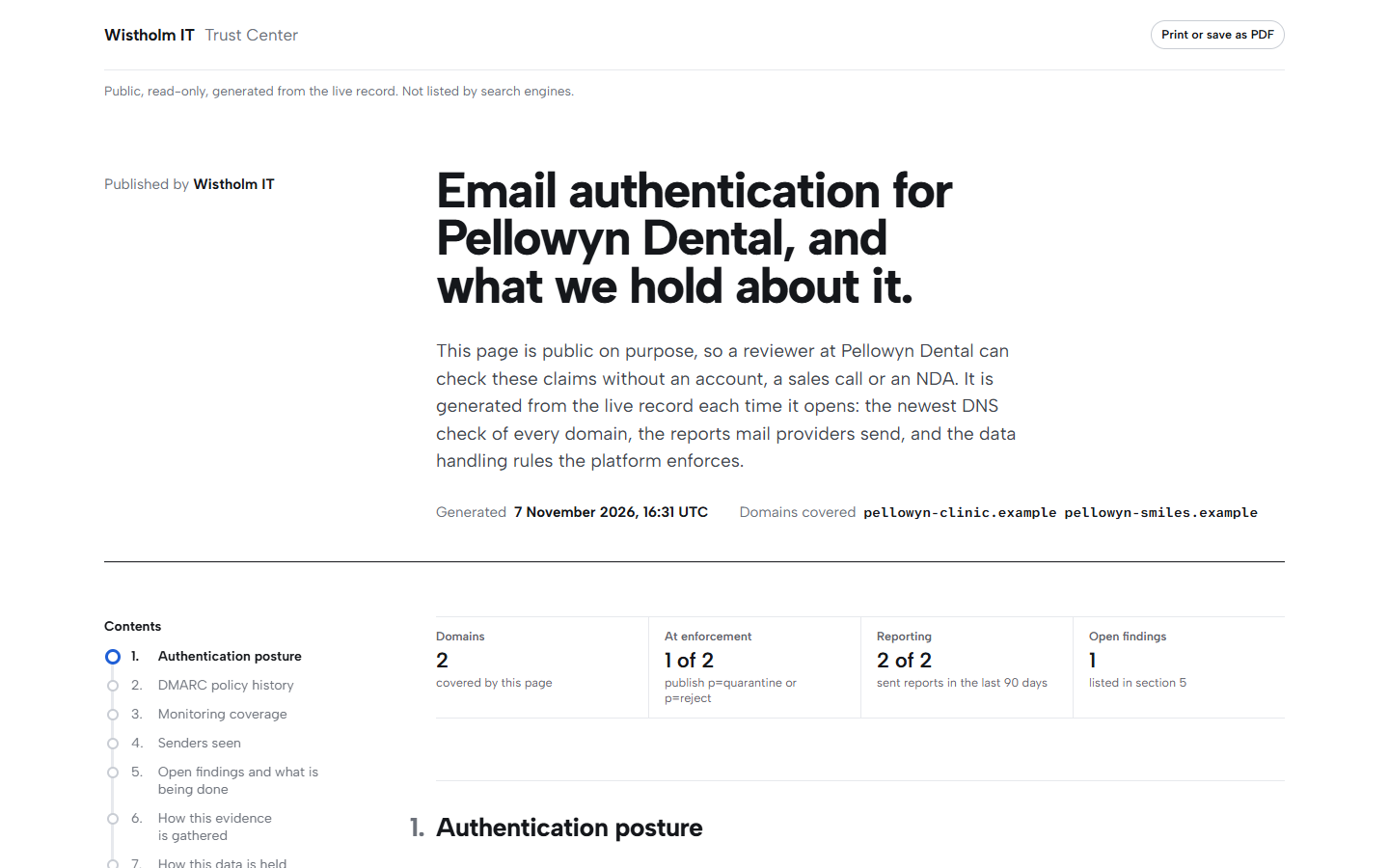
What is a prospect report?§ Link
A plain-language email security check of a company you want to win, shared as a link under your workspace's name. It is a snapshot taken when you create it, so opening the link never scans anyone's DNS. Fairway includes 10 a month, Harbor 50, Admiralty and Fleet 200. Every report created in a calendar month (UTC) counts, including one you have since removed, because each one was a scan.
Can I use my own brand?§ Link
From Harbor, your agency's name, logo and colours appear in the client portal, on monthly reports, Trust Centers and prospect reports, and in the emails clients receive. Unless you send from your own address (see below), those emails come from our shared address with your agency's name in front. The pages open at our address.
Also from Harbor, add a support email and a support page under Settings, White label, Client contact. Clients see them in the portal, and on the sign-in page once it is on your own domain. Replies to the emails they receive go to your support email.
On Admiralty, add your own domain, such as reports.youragency.example, under Settings, White label. Publish the two records it shows at your DNS host: a TXT record that proves the domain is yours, and a CNAME that points it at us. The page shows each step, and the domain goes live once it opens through us, usually within minutes of the CNAME being found. Until then, the links you send keep using our address. From then on everything a client opens is on your address: the portal and its sign-in page, share links, Trust Centers, prospect reports, and the links in monthly report and password reset emails. Clients sign in there with email and password, because Google and Microsoft sign-in only complete on our address. The browser tab shows your initial, and our pricing, guides and legal pages are not served on your domain.
Admiralty can also send client emails from your own address, such as reports@mail.youragency.example. Add it under Settings, White label, Email from your domain, publish the DKIM and SPF records it shows, and check them. Use a subdomain such as mail.youragency.example, so the records never touch your main mail. Until the address is verified, and again if the records are later removed, client emails come from our shared address with your agency's name.
Team and security§ Link
Which domains are yours?§ Link
Two: dmarcharbor.com, for the website, the app and our email, and dmarcharbour.com (British spelling), which holds the records we host for you, so your CNAMEs point there. Opening dmarcharbour.com in a browser takes you to dmarcharbor.com. Anything on another domain that claims to be us is not; forward it to security@dmarcharbor.com.
Can colleagues work in the same workspace?§ Link
Yes. Invite them by email as an admin, analyst or viewer. Admins run the workspace but cannot change the plan or delete the workspace. Analysts can change domains and reports but cannot add or delete domains, delete reports, manage clients or see named forensic recipients. Viewers read clients, domains and reports, and cannot see forensic data at all. Everyone on the team can see the plan and its usage; only the owner can change it. Each plan has a team size, and open invitations count against it; an invitation that has expired does not. A workspace has one owner, who can hand it to another member under Settings, Members, confirming with their password or an authenticator code. They stay on as an admin, and the workspace then follows the new owner's plan.
How do you sign me in?§ Link
Email and password, or Google or Microsoft. Two-step verification with an authenticator app is available on every plan, and each code works once. Turning it on turns off Google and Microsoft sign-in for that account, because we cannot see whether they asked for a second step; you sign in with your email, password and code instead. A workspace can require two-step verification of everyone, and members who sign in with Google or Microsoft then set a password and an authenticator app. After 10 wrong passwords in 15 minutes, password sign-in for that account pauses for 15 minutes and we email you; a password reset gets you in straight away. We email you whenever your password changes. You can see and end every signed-in device under Settings, Signed-in devices, or from the account menu.
How do I change my password?§ Link
Under Settings, Password and two-step. Enter your current password and a new one of at least 8 characters; a password found in a known data breach is refused. "Sign out my other devices" is ticked for you, so the old password and every other session stop working together. We email you to confirm the change. If you sign in with Google or Microsoft and have no password, Set a password there emails you a link instead. Forgotten it? Use Forgot password? on the sign-in page.
Do you support single sign-on?§ Link
Yes, on Admiralty. SAML and OIDC are both supported, with just-in-time provisioning limited to the email domains you allow. An email domain admits people only once the workspace has proved it controls it: add it under a client and complete its ownership check. Until then the connection says which domains are not verified yet.
What happens to single sign-on if we leave Admiralty?§ Link
Nobody new can join through your connection. Existing members can keep signing in through it for 30 days. After that they sign in with their email address and password. Anyone who joined through single sign-on and never set a password can create one with Forgot password on the sign-in page.
What about forensic reports and personal data?§ Link
Forensic reports can contain recipient addresses and subject lines. We collect them only when you switch that on for a domain, and store recipient addresses as one-way pseudonyms by default. On Harbor and above you can keep named recipients for a domain when you have a lawful basis; they are encrypted and deleted after 7 days on every plan.
How long do you keep my data?§ Link
The same on every plan: aggregate and TLS reports for 400 days, forensic reports for 30 days, and named recipient details for 7 days. A data export can be downloaded for 7 days. The audit trail is kept until a deletion request removes it. Your Trust Center and compliance packs state these figures, so the answer is never a guess.
How do I export or delete my data?§ Link
From the workspace settings, on every plan, by the workspace's owner or an admin (erasure by the owner). An export covers everything we hold for the workspace except passwords and session tokens, and says what it left out. Erasure shows exactly what will be deleted first and then waits 7 days, so a mistake can be cancelled.
How are my credentials stored?§ Link
Encrypted at rest: Cloudflare tokens, PSA credentials, mailbox passwords, and the Slack and Teams addresses alerts post to. We never show a stored secret in full again.
Where is my data stored?§ Link
In the European Union, in Frankfurt: the application runs on Amazon Web Services and the database is Neon PostgreSQL, both in that region, for every customer and every plan. Email goes through Resend in the United States. The Sub-processors notice lists everyone who processes the data, with each one's region, and your Trust Center and compliance packs state the same.
How do I bill my clients for what they used?§ Link
On the Clients page, choose a month and download the usage CSV. It has one row per client: domains, verified and active domains, aggregate reports, messages, the DMARC pass rate, forensic reports and alerts opened, then a totals row. It covers complete months only, the last twelve, and counts each report in the month its reporting period starts, the same as the monthly client report. The same figures are at GET /api/v1/usage for a PSA or billing tool. Starts on Harbor.
Is there an API?§ Link
Yes, on Harbor and above. The workspace owner creates API keys that read, or read and change. The reference, with every endpoint, example and error, is at /docs/api; the machine-readable version is /api/docs/openapi.json, and changes are listed in the API changelog.
Support§ Link
How do I get help?§ Link
Email support@dmarcharbor.com. See the Complaint Policy for targets and escalation.
Can I ask questions inside the app?§ Link
Yes, on Harbor, Admiralty and Fleet. Ask, in the bottom-right corner of the app, takes a question about the product and answers it from this FAQ, the setup guide, the API reference, the pricing page and the legal pages, with links to the pages it used. It cannot see your workspace's data and never changes anything. When those pages do not answer a question, it says it does not know and points you to support. Each person can ask 10 questions a minute, and a workspace 200 a day. A question it could not answer is kept for 180 days so these pages can be improved, with email addresses, domains and IP addresses removed and nothing that links it to you or your workspace.
Is there a service level agreement?§ Link
Not unless one is agreed in writing.
How do I report a security issue?§ Link
Email security@dmarcharbor.com. We do not run a bug bounty programme at present, and we will say so here if that changes.
Still stuck§ Link
Email support@dmarcharbor.com. If something here is wrong or out of date, tell us and we will fix it.